

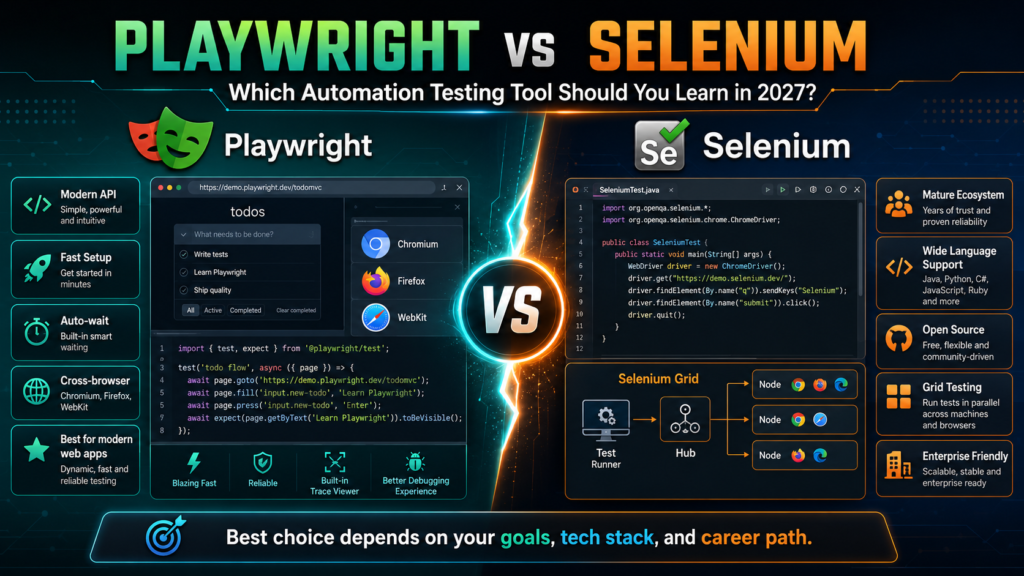
Playwright vs Selenium is best answered by the environment you want to work in. Learn Playwright first if you are starting a new automation career, targeting modern web applications, comfortable with JavaScript or TypeScript, and want built-in waiting, parallel execution, traces, screenshots and reporting. Learn Selenium first if your target employers maintain established WebDriver suites, rely heavily on Java, Python or C#, need broad enterprise compatibility, or already use Selenium Grid and mature testing frameworks.
For many learners in 2027, the strongest strategy is not to pick one tool forever. Build automation fundamentals with one tool, become competent enough to design reliable tests, and then learn the second tool at a practical level. Employers hire testers who understand test design, locators, synchronization, APIs, version control and CI/CD. Tool syntax is only one part of the job.
What Is Playwright?
Playwright is an open-source browser automation framework developed by Microsoft for end-to-end testing of modern web applications. The official Playwright Test package combines a test runner, assertions, test isolation, parallel execution and debugging tools. It supports Chromium, Firefox and WebKit on Windows, Linux and macOS, and can run locally or in continuous integration in headed or headless mode.
- Auto-waiting: Actions wait for elements to become actionable, reducing the amount of manual synchronization code.
- Locator-based testing: Role, text, label and test-ID locators encourage readable tests and can retry during assertions.
- Browser contexts: Isolated contexts make multi-user scenarios and parallel execution easier without launching a full browser each time.
- Trace Viewer: Traces can capture actions, screenshots, network activity, console messages and a DOM snapshot for debugging.
- Network control: Tests can monitor, modify or mock browser network traffic without adding a separate proxy tool.
- Built-in runner: The Node.js version includes projects, fixtures, retries, reporters, parallel workers and HTML reports.
- Cross-browser projects: A single configuration can run suites across Chromium, Firefox, WebKit and device profiles.
- API testing support: Playwright can make HTTP requests, prepare data and test APIs alongside browser flows.
What Is Selenium?
Selenium is a long-established open-source browser automation project built around the W3C WebDriver standard. It supports browser automation through multiple language bindings and works with test runners such as JUnit, TestNG, NUnit, pytest and other ecosystem tools. Selenium Grid provides distributed and remote execution patterns used by many enterprise teams and cloud testing services.
- W3C WebDriver: A vendor-neutral browser automation standard supports portability and a broad range of environments.
- Multiple languages: Common bindings include Java, Python, C#, Ruby and JavaScript.
- Large ecosystem: Years of adoption have produced extensive frameworks, integrations, training and community answers.
- Selenium Grid: Teams can execute tests across remote machines, browsers and operating systems.
- Enterprise familiarity: Many established organisations already have Selenium suites, standards and internal expertise.
- Framework flexibility: Selenium can be combined with the test runner, assertion library, reporting system and architecture chosen by the team.
- Wide browser history: Selenium remains useful where organisations need broader or older browser strategies and existing WebDriver infrastructure.
- Transferable concepts: Selenium experience builds knowledge of locators, waits, page objects, browser sessions and distributed execution.
Playwright vs Selenium Comparison Table
| Criteria | Playwright | Selenium | 2027 decision |
| Best fit | Modern end-to-end web testing and greenfield suites. | Established enterprise suites, broad language ecosystems and WebDriver infrastructure. | Choose the context you expect to work in. |
| Primary experience | Cohesive framework with runner and tooling, especially in TypeScript. | Automation library integrated with a chosen test framework. | Playwright is simpler as a complete starter stack. |
| Languages | JavaScript or TypeScript, Python, Java and .NET. | Java, Python, C#, Ruby and JavaScript, with a mature ecosystem. | Selenium has broader historical language adoption. |
| Browsers | Chromium, Firefox and WebKit builds managed by Playwright. | Major browsers through WebDriver implementations and remote services. | Selenium can suit broader enterprise and legacy requirements. |
| Waiting | Built-in actionability checks and retrying assertions. | Teams commonly design explicit or fluent wait strategies. | Playwright reduces timing boilerplate but cannot fix poor test design. |
| Parallelism | Built into Playwright Test with workers and projects. | Implemented through test runners, Grid and framework configuration. | Playwright offers a more integrated path. |
| Debugging | Trace Viewer, UI mode, screenshots, videos and HTML reports. | IDE debugging plus framework, logging and reporting integrations. | Playwright provides a strong out-of-box experience. |
| Network mocking | Built-in routing and network interception capabilities. | Often uses browser features, DevTools integration or supporting libraries. | Playwright is convenient for modern frontend testing. |
| Mobile | Emulation of mobile browser profiles; not native app automation. | Mobile web plus connection to wider Appium ecosystems for native apps. | Choose Appium for native mobile application automation. |
| Learning resources | Growing quickly with modern documentation and examples. | Very large historical community and training ecosystem. | Both are learnable; quality and recency of material matter. |
| Migration cost | Attractive for a new suite but migration requires rewriting and validating tests. | Existing suites can continue to deliver value without a fashionable rewrite. | Do not migrate without a business case and measured pilot. |
| Ownership | Microsoft-led open-source project. | Community-led project using a W3C standard. | Governance may matter to long-term enterprise strategy. |

Which Tool Is Faster?
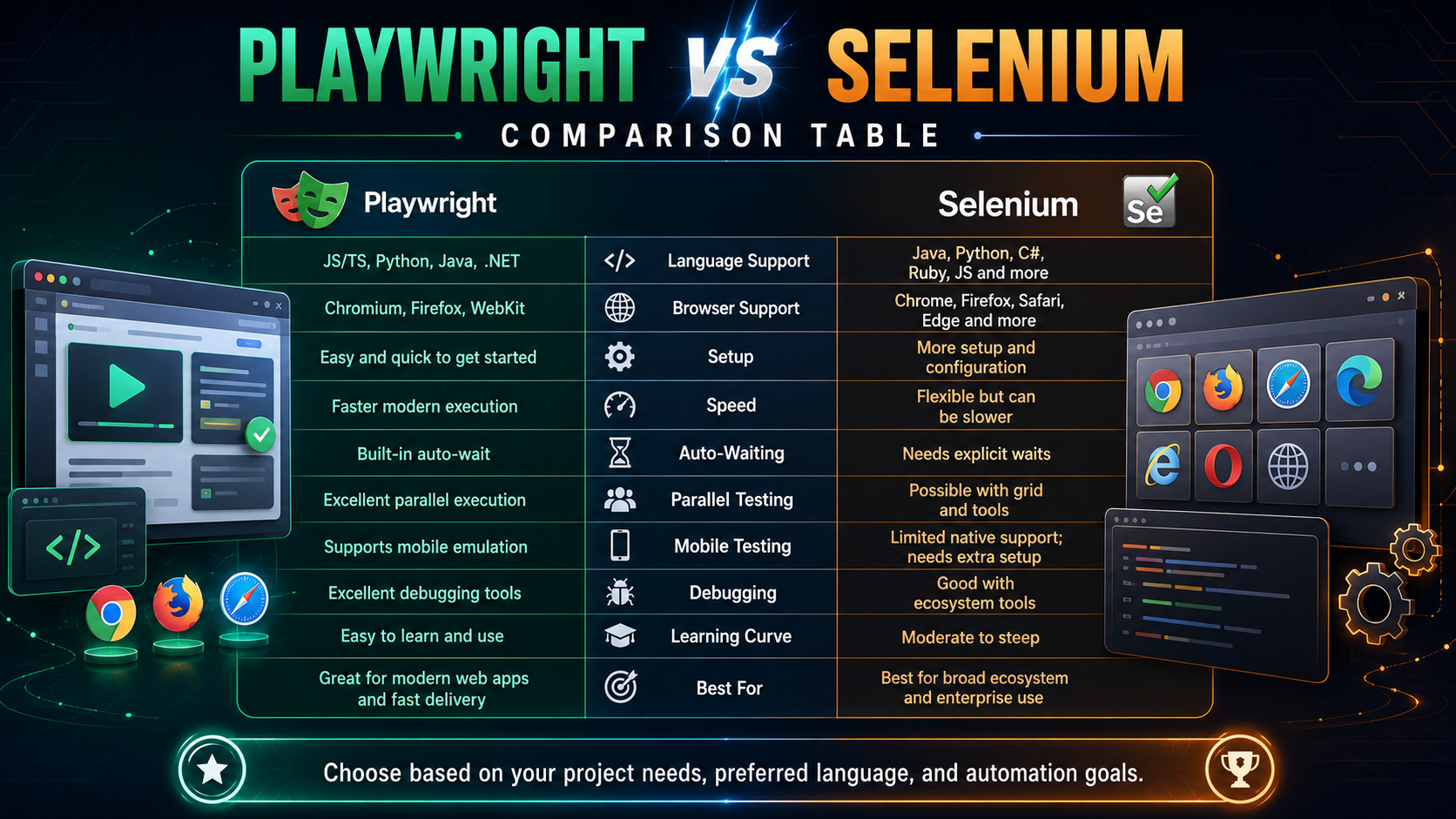
Playwright often feels faster to set up and can execute modern browser tests efficiently because the runner, browser management, contexts, parallel workers and waiting model are integrated. Selenium performance depends heavily on the selected language, framework, driver, Grid infrastructure, test design and remote execution environment. A simple benchmark rarely predicts production-suite speed.
The more useful question is “How quickly can the team produce trustworthy feedback?” A suite that runs in five minutes but fails unpredictably wastes more time than a ten-minute suite with stable diagnostics. Measure total feedback time, including setup, retries, failure investigation, environment provisioning and maintenance.
- Test scope: Keep most checks below the user-interface layer when unit, component or API tests can provide faster feedback.
- Parallel design: Use independent test data and isolated accounts so tests can run safely at the same time.
- Environment quality: Unstable test environments create failures no automation framework can solve.
- Network distance: Cloud browsers and remote Grids add latency that local benchmarks hide.
- Diagnostics: Traces, logs and screenshots reduce the time needed to understand a failure.
- Suite architecture: Poorly coupled page objects, shared state and long workflows make either tool slow and brittle.
Which Tool Produces More Reliable Tests?
Playwright has strong defaults for modern applications. Auto-waiting, retrying assertions, browser-context isolation and locator APIs reduce common causes of timing-related failure. Selenium can also produce highly reliable tests, but the team normally needs to design synchronization, framework conventions, data control and diagnostics more deliberately.
Neither framework can guarantee stability. Flaky tests often come from shared data, asynchronous background processing, unstable selectors, animation, third-party services, environment problems or assertions that test too much at once. A skilled automation tester identifies the actual cause instead of hiding it with unconditional sleeps and excessive retries.
Playwright vs Selenium for Different Types of Testing
Modern single-page applications
Playwright is often the stronger first choice for React, Angular, Vue and similarly dynamic applications because of locators, auto-waiting and network control.
Legacy enterprise web applications
Selenium may fit better when the organisation already has WebDriver infrastructure, Java frameworks, broad browser matrices or long-lived suites.
Cross-browser customer journeys
Both tools can cover major browsers. Define supported browsers using real customer and risk data rather than testing every possible combination.
API and UI workflows
Playwright provides a convenient integrated API request context for data setup and combined checks. Selenium teams usually pair browser automation with a separate HTTP client library.
Visual regression
Both can integrate with visual testing services. Playwright includes screenshot assertions, while Selenium has extensive third-party options.
Accessibility testing
Both can integrate with accessibility engines. Automated checks cover only part of accessibility and require manual review.
Native mobile apps
Neither Playwright nor Selenium alone is the primary native-app framework. Appium and platform-specific tools are more suitable.
Desktop applications
These browser-focused tools are not general desktop automation solutions. Choose technology aligned with the application platform.
Web scraping
Both can automate browsers, but legal, contractual, privacy and site conditions must be respected. This career guide focuses on authorised software testing.
Performance testing
Neither replaces a dedicated load-testing tool such as JMeter, k6 or Gatling. UI timing can complement, not replace, performance engineering.
Which Programming Language Should You Use?
The language decision can be more important than the framework decision because it affects job alignment, peer review, libraries and maintainability. Use the language supported by the team that will own the tests.
Playwright with TypeScript
The default recommendation for a new learner targeting modern web automation. TypeScript provides strong editor support and aligns with frontend development ecosystems.
Selenium with Java
A practical choice for enterprise automation roles, established frameworks, banks, consultancies and organisations with Java testing standards.
Python with either tool
Readable and useful for QA automation, API work and data tasks. Check local job demand and the target team’s stack.
C# with either tool
Relevant to Microsoft and .NET environments where developers and testers share language expertise.
JavaScript with Selenium
Suitable when the organisation already uses Selenium but wants alignment with Node.js development tooling.
Career Demand: What Should Australian Testers Learn?
Selenium remains a visible skill in Australian QA recruitment because many organisations have existing Java or C# automation estates. Playwright demand is growing as teams modernise frontend development and create new end-to-end suites. A learner should search current advertisements for “automation tester”, “QA engineer”, “SDET”, “test automation engineer”, “Playwright”, “Selenium”, “TypeScript” and “Java”, then compare suitable roles by city and experience level.
The Software Testing Course Australia website emphasises practical training in manual testing, automation, Selenium, API testing, bug tracking, Agile testing and job-ready QA workflows. Its course catalogue includes an Introduction to Automation Testing course and an A4Q Selenium 4 Tester Foundation pathway, helping learners build structured fundamentals before specialising.
Course links: Browse software testing courses | View Introduction to Automation Testing | Explore software testing training options
Which Tool Should a Beginner Learn First?
- Complete beginner with no coding: Start with software-testing fundamentals, test cases, defects, Agile and basic programming. Then select Playwright with TypeScript or Selenium with Java.
- Manual tester moving to automation: Playwright may provide faster early progress, but choose Selenium when current employers or target jobs use it.
- Java developer moving into QA: Selenium with Java offers immediate language leverage. Playwright Java can be learned later for modern suites.
- Frontend developer adding end-to-end tests: Playwright with TypeScript is usually the natural choice because it aligns with Node.js projects and modern developer workflows.
- QA professional maintaining Selenium: Do not abandon valuable expertise. Learn Playwright through a small pilot and compare reliability, maintenance and CI time.
- Graduate targeting broad employability: Learn one tool deeply, Git, SQL, APIs, CI/CD and testing theory. Add the second framework once the first portfolio is credible.
A 12-Week Learning Roadmap
Weeks 1-2: Testing foundations
Learn test levels, test types, risk, equivalence partitioning, boundary values, defects, regression and Agile workflows.
Weeks 3-4: Programming basics
Practise variables, conditions, loops, functions, classes, collections, exceptions and package management in the chosen language.
Weeks 5-6: Browser automation
Create stable locators, navigate pages, interact with controls, handle frames and tabs, and write meaningful assertions.
Weeks 7-8: Framework design
Add reusable fixtures or page objects, configuration, data management, logging, screenshots and reports.
Weeks 9-10: API and CI/CD
Use APIs for test setup, commit to Git, run tests in a pipeline and publish artefacts.
Weeks 11-12: Portfolio project
Automate a safe practice application, document scope and risk, explain failures and present the suite as a hiring portfolio.
Portfolio Projects That Employers Can Review
Ecommerce smoke suite
Automate product search, filter, basket and checkout validation using safe test data. Include browser projects, traces and a CI workflow.
Role-based portal suite
Model two user roles with isolated sessions, verify permissions and show how test data is created and removed.
API plus UI workflow
Create data through an API, verify it in the browser and clean up through an API. Explain why this is faster than completing every setup step through the UI.
Flaky-test repair case study
Take an unstable practice test, diagnose the synchronization or data problem, remove fixed sleeps and document the improvement.
Cross-browser risk matrix
Select a small set of high-value journeys and justify execution across Chromium, Firefox and WebKit or WebDriver browsers.
Selenium-to-Playwright comparison
Implement the same three flows in both frameworks and compare setup, code clarity, diagnostics, execution and maintenance without claiming a universal winner.
Playwright and Selenium Skills Employers Actually Value
- Test design linked to customer and business risk
- Stable locators based on accessible roles, labels and test IDs
- Correct synchronization without unconditional sleeps
- Independent test data and cleanup
- Readable assertions with useful failure messages
- Git branches, pull requests and code review
- API testing and service-level validation
- Continuous integration and test artefacts
- SQL and data verification
- Root-cause analysis of flaky tests
- Clear defect reports and stakeholder communication
- Understanding when not to automate a test
Common Automation Mistakes to Avoid
- Automating everything: Select repeatable, valuable and stable checks. Manual exploration remains essential.
- Using brittle selectors: Avoid long CSS or XPath chains tied to layout details when a stable semantic locator is available.
- Adding fixed sleeps: Waiting a guessed number of seconds makes suites slow and unreliable.
- Creating long end-to-end chains: A single failure can block many assertions and make diagnosis difficult.
- Sharing test state: Tests that depend on execution order cannot run safely in parallel.
- Ignoring test data: Reliable automation requires predictable setup, isolation and cleanup.
- Hiding failures with retries: Retries can collect evidence but should not replace root-cause analysis.
- Testing implementation details: Focus on observable behaviour and outcomes instead of copying the application’s internal logic.
- Skipping code review: Automation is production code and needs standards, review and maintenance.
- Learning syntax without testing theory: A fast script is not valuable if it checks the wrong behaviour.
Software Testing Training Across Australian Cities
- Sydney: Finance, consulting, government suppliers, ecommerce and technology firms create demand for modern and established automation stacks.
- Melbourne: Product companies, health, education, retail and enterprise teams use a mix of Selenium, Playwright, API and Agile testing skills.
- Brisbane: Government, utilities, health and growing digital teams value testers who can combine manual analysis with automation.
- Perth: Resources, services and distributed enterprise systems create opportunities for practical QA and integration testing skills.
- Adelaide: Defence, government, health and technology programs can require structured testing, documentation and eligibility conditions.
- Canberra: Public-sector and supplier projects may place extra emphasis on traceability, security, accessibility and formal test evidence.
- Hobart and Darwin: Live online learning can help candidates build automation skills for local, national and remote opportunities.
Explore software testing course locations across Australia
Frequently Asked Questions
Is Playwright better than Selenium in 2027?
Playwright is often better for new modern web suites because of integrated tooling, auto-waiting, browser contexts and debugging. Selenium remains better for many established enterprise environments, broader historical language adoption and WebDriver infrastructure.
Should beginners learn Playwright or Selenium first?
A beginner without an employer constraint can start with Playwright and TypeScript. A learner targeting Java enterprise QA roles should consider Selenium and Java. Testing fundamentals come before framework syntax.
Is Selenium still worth learning in 2027?
Yes. Selenium remains widely used, standards-based and supported by a mature ecosystem. Existing enterprise suites will require skilled maintenance and improvement for years.
Will Playwright replace Selenium?
Playwright will continue to win new projects, but replacement is unlikely to be universal. Migration has cost and risk, and Selenium remains valuable where its ecosystem and standards fit.
Which is easier, Playwright or Selenium?
Playwright usually offers an easier integrated starting experience. Selenium learning can involve selecting and configuring a test runner, waits, reports and framework components.
Which tool is better for Java?
Selenium has deep Java adoption and extensive enterprise examples. Playwright supports Java, but Playwright Test features are strongest in its Node.js and TypeScript ecosystem.
Which tool is better for TypeScript?
Playwright is generally the stronger first choice because its test runner, configuration, fixtures and tooling are designed around modern JavaScript and TypeScript workflows.
Can Playwright test mobile apps?
Playwright can emulate mobile browser devices, viewports and input. It does not replace Appium or platform-specific tools for native iOS and Android applications.
Do I need to learn both tools?
Not immediately. Learn one deeply enough to create a reliable CI-ready project, then learn the second to widen employability and understand migration decisions.
Where can I study automation testing in Australia?
Software Testing Course Australia offers instructor-led pathways in automation testing, Selenium, manual testing and related QA skills across major cities and live online delivery.
Final Verdict: Playwright or Selenium?
Choose Playwright in 2027 when you want a modern, integrated end-to-end framework for new web applications and a TypeScript-friendly workflow. Choose Selenium when the target organisation has a mature WebDriver ecosystem, broad language requirements, established Grid infrastructure or a large existing suite. For career growth, learn automation principles rather than defending one brand. The tester who can select the right layer, write stable tests, debug failures and explain risk will remain valuable as tools evolve.
Ready to build job-ready automation skills? Compare software testing and automation courses